It's not a race
Chase mode - "It's not a race!"
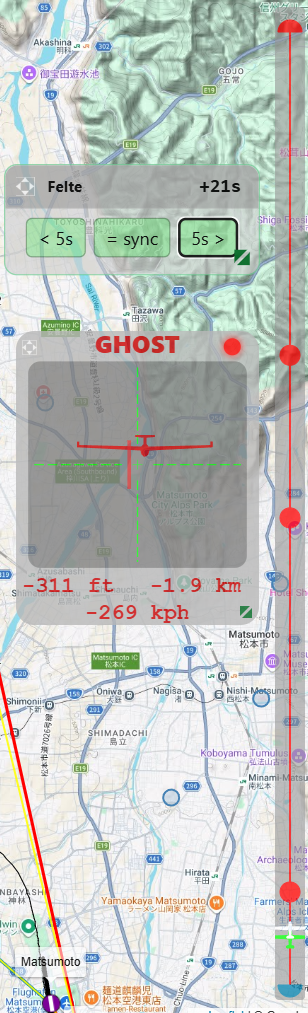
Chase mode is a graphical radar HUD in the SSC-Tracker map that lets you compare yourself directly with another pilot - a ghost or a real group member in live multiplayer. It shows in real time where the target aircraft is relative to you on the task.
Switching it on
Switch chase mode on in the settings of the SSC-Tracker map: turn on "It's not a race!".
The chase HUD appears on the map and picks the nearest or most relevant fellow pilot as the target by itself. Clicking a pilot in the aircraft table selects the target by hand. Clicking the same pilot again clears the manual selection.
The chase HUD
The chase HUD has two parts:
1. Radar panel (the centred HUD window)
The HUD shows the target aircraft as a glider graphic on a crosshair:
- Horizontal position: relative bearing to the target - to the left means the target is to your left, and correspondingly to the right.
- Vertical position: relative height - the target sits at the top of the HUD when it is higher, at the bottom when it is lower.
- Aircraft graphic: shows the target from the front or from behind (depending on its direction).
- Red line: the direction to the next task waypoint.
- Altitude: height difference between you and the target [ft/m].
- Distance: distance to the target [nm/km].
- Speed: difference in ground speed [kn/km/h]. Positive = you are faster.
2. Task progress strip (the narrow bar at the edge)
A vertical strip shows the whole task as a line with waypoint marks:
- Green marker - your own position along the route
- White marker - the target's position along the route
So a single glance tells you who is further along.
Chase mode with a ghost
Chase mode works with an active ghost flight too. The ghost aircraft is treated like an ordinary pilot and appears as a chase target automatically once "It's not a race!" is on. That way you can compare your flight in real time with the recorded performance of the original.
In the Overlay, chase exists twice over, as modules of its own: Chase HUD shows the radar picture with the differences to you - distance, height, ground speed, green when you are ahead, higher or faster. Chase Track lays the whole task out as a band and puts your opponent on it, so one glance tells you who is where.
You pick the target either automatically (the tracker takes the nearest) or by hand: click a pilot ID in the Aircrafts module. The row is then marked green. Clicking the same ID again switches back to automatic.
Ghost HUD on the map
While a ghost is active and "It's not a race!" is set, a small ghost HUD and a virtual route appear in the SSC-Tracker map by themselves. It shows the name of the ghost pilot and the current time offset, and lets you fine-tune it in flight - without switching to the app:
| Button | Function |
|---|---|
| < 5s | Move the ghost 5 seconds back (the ghost flies earlier in the task) |
| = sync | Synchronise the ghost to your current task time automatically |
| 5s > | Move the ghost 5 seconds forward (the ghost flies later in the task) |
The HUD can be positioned and scaled freely.